【JQuery】PythonサーバーでMySQLに接続して DataTables にデータを表示する
おはようございます。
DataTablesを試しているのですが、
せっかくなのでデータベースから取得したデータを表示してみようかと思います。
手っ取り早く Python + MySQL で実装します。
プロジェクトは新規で作成しますが、
PythonやMySQLについては過去記事を参考にしていただければ。
スポンサーリンク
新規プロジェクトの作成
新たにサンプル用プロジェクトを作成します。
PyCharmを起動し、上部メニューの「File」>「New Project」を選択し、
ウィザードに沿ってプロジェクトを新規作成します。
フォルダ構成は次の通りとします。
DataTableSample
│ Main.py
│
└─templates
Main.html
パッケージのインストール
Tornado、MySQL接続用のパッケージをインストールします。
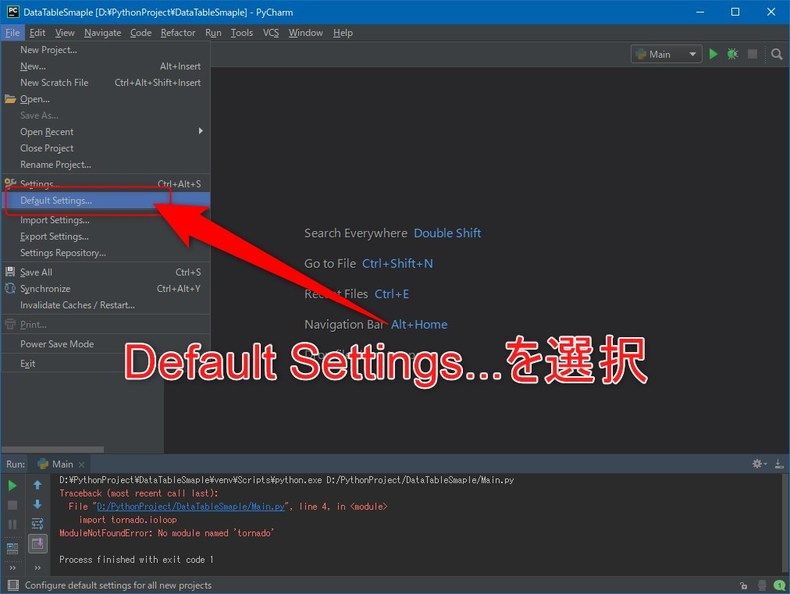
「File」>「Default Settings…」メニューを選択します。
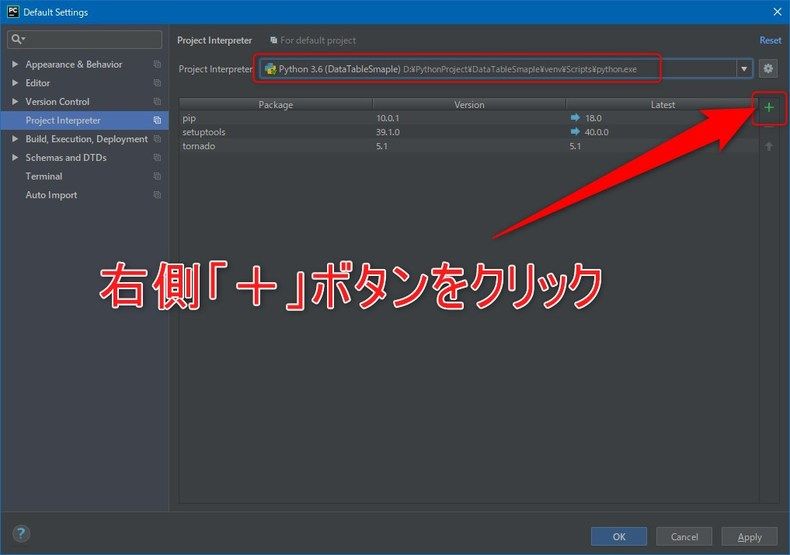
プロジェクトを選択し、右側にある「+」ボタンをクリックします。
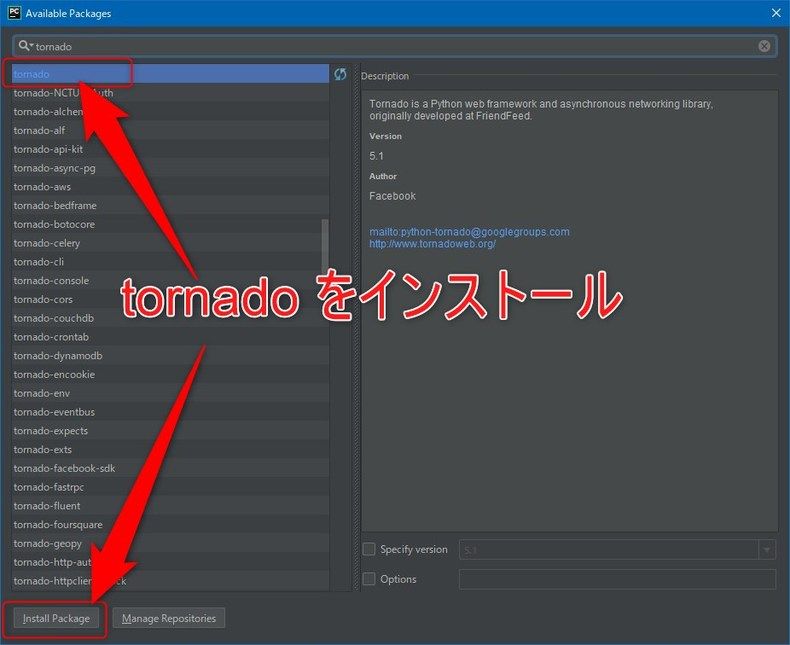
検索欄に「tornado」と入力、表示されたパッケージを選択し、「Install Package」ボタンをクリックします。
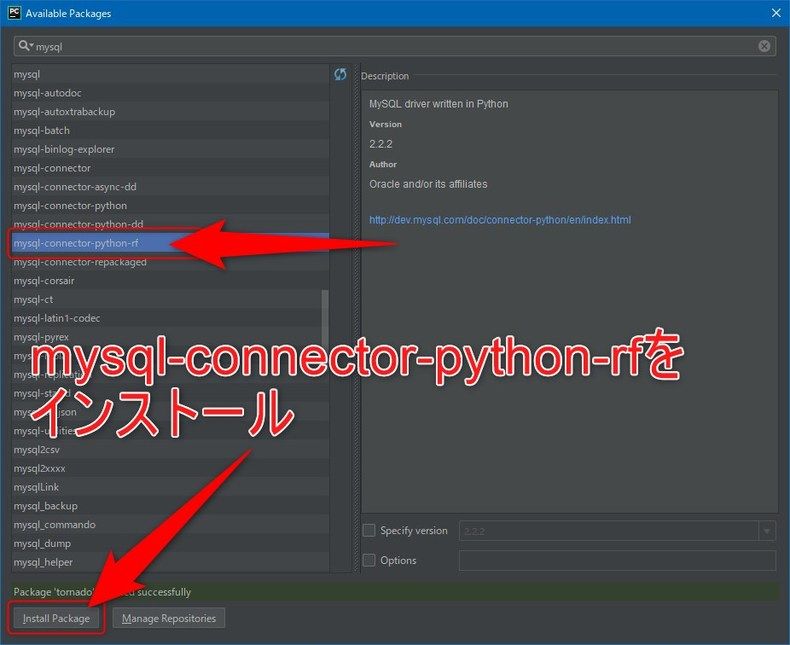
先ほどと同様、「mysql-connector-python-rf」パッケージをインストールします。
以上で事前準備は完了です。
画面の作成
前回、単純にHTMLで作成したものを流用します。
Main.html
<!DOCTYPE html>
<html lang="ja">
	<head>
		<meta charset="UTF-8">
		<title>DataTableサンプル</title>
		<link rel="stylesheet" type="text/css" href="https://cdn.datatables.net/1.10.19/css/dataTables.bootstrap.min.css"/>
		<link rel="stylesheet" type="text/css" href="https://maxcdn.bootstrapcdn.com/bootstrap/3.3.7/css/bootstrap.min.css"/>

		<style>
			.container {
				border: 1px solid black;
				padding: 1rem;
				margin: 1rem;
			}
		</style>
	</head>
	<body>
		<div class="container container-fluid">
			<table id="myTable" class="table table-striped tagle-bordered">
				<thead>
					<tr>
						<th>No</th>
						<th>名前</th>
						<th>性別</th>
						<th>年齢</th>
						<th>種別</th>
						<th>好物</th>
					</tr>
				</thead>
				<tfoot>
					<tr>
						<th>No</th>
						<th>名前</th>
						<th>性別</th>
						<th>年齢</th>
						<th>種別</th>
						<th>好物</th>
					</tr>
				</tfoot>
			</table>
		</div>
	</body>
	<script type="text/javascript" src="https://code.jquery.com/jquery-3.3.1.js"></script>
	<script type="text/javascript" src="https://cdn.datatables.net/1.10.19/js/jquery.dataTables.min.js"></script>
	<script type="text/javascript" src="https://cdn.datatables.net/1.10.19/js/dataTables.bootstrap.min.js"></script>

	<script>
		$(document).ready( function () {

			$('#myTable').DataTable({
				'processing'  : true,
        		'serverSide'  : true,
				'ajax'        : {
					'url'  : '/search',
					'type' : 'POST'
				},
				'columns'     : [
					{ 'data' : 'no' },
					{ 'data' : 'name' },
					{ 'data' : 'sex' },
					{ 'data' : 'age' },
					{ 'data' : 'kind_name' },
					{ 'data' : 'favorite' },
				]
			});
		} );
	</script>
</html>
べた書きしていたテーブルの内容を削除し、
ページ表示時に、サーバーからデータを取得するように javascript の部分を変更しています。
プログラム
Main.py
import json
import logging
import os
import tornado.ioloop
import mysql.connector

from tornado.web import RequestHandler
from tornado.options import options
from contextlib import closing


class MainHandler(RequestHandler):
    """
    画面表示
    """

    def get(self):
        logging.info("MainHandler [get]")

        self.render("Main.html")


class SearchHandler(RequestHandler):
    """
    データ検索
    """

    def post(self):
        """
        データをJSON形式で返します
        :return:
        """
        logging.info("SearchHandler [post]")

        with closing(mysql.connector.connect(
            host="localhost",
            port="3306",
            user="USER01",
            password="USER01",
            database="DB01"
        )) as conn:

            c = conn.cursor(dictionary=True)

            # SQL組み立て
            sql = "SELECT C.NO, C.NAME, C.SEX, C.AGE, C.KIND_CD, K.KIND_NAME, C.FAVORITE FROM TBLCAT C"
            sql += " LEFT OUTER JOIN MSTKIND K ON ( C.KIND_CD = K.KIND_CD)"

            list = []
            c.execute(sql)
            for r in c.fetchall():
                list.append({
                    "no": r['NO'],
                    "name": r['NAME'],
                    "sex": r['SEX'],
                    "age": r['AGE'],
                    "kind_name": r['KIND_NAME'],
                    "favorite": r['FAVORITE'],
                })
        result = {
            'draw': 1
            , 'recordsTotal': 4
            , 'recordsFiltered': 4
            , 'data': list
        }

        self.write(json.dumps(result, ensure_ascii=False))


app = tornado.web.Application([
    (r"/", MainHandler),
    (r"/search", SearchHandler),
],
    template_path=os.path.join(os.getcwd(), "templates"),
    static_path=os.path.join(os.getcwd(), "static"),
)

if __name__ == "__main__":
    options.parse_command_line()
    app.listen(8080)
    logging.info("server started")
    tornado.ioloop.IOLoop.instance().start()
MySQLからデータを取得して、JSON形式で返却するようにしています。
若干はまったのが、
JSONの形式で、「data」のキーに表示するデータのリストを設定しないと表示ができなかったところですかね。
そのほかのキーについてはちょっと検証していません。
起動してみる
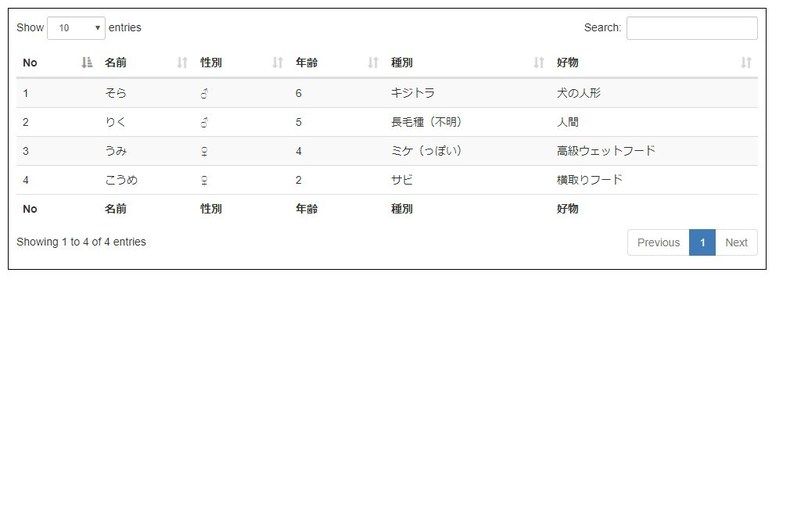
無事にデータが表示されました。
まとめ
サーバー側との通信もJSONで行えるので便利ですね。
(最近そんなのばかりですが)
気が向いたら、検索やデータ追加、更新なんかもやってみようかと思います。
ではでは。