【Python】bitflyerのTickerを SQLiteに突っ込む(定期処理)
おはようございます。
前々回に続き、TickerをSQLiteに登録する処理で、今回は定期的に実行する方法を書いてみました。
本当はスレッドなんかで各分毎に処理を動かしたかったのですが、大分躓いてしまったのでとりあえず1分単位のみ。
プログラムは前々回のものを流用します。
【Python】BitflyerのTickerをSQLiteに突っ込む
スポンサーリンク
新規クラスの追加
単独で動かすクラスを追加
BackgroundSaveTicker.py
# -*- coding: utf-8 -*-
"""
Created on 2018/03/14
@author: doraxdora
"""
import json
import time
import threading
import asyncio

from BfApi import BfApi
from Utils.SQLiteUtil import SQLiteUtil


class BackgroundSaveTicker:

    def __init__(self, interval, wait=True, db_name="Ticker.db"):
        self.interval = interval
        self.wait = wait
        self.db_name = db_name
        self.api = BfApi()

    def task(self):

        data = self.api.call_pub_nub('lightning_ticker_FX_BTC_JPY')
        message = json.dumps(data)
        print(self.db_name + ":" + message)
        sqlite_util = SQLiteUtil(db_name=self.db_name)
        sqlite_util.insert_data(self.api.convert_ticker_tuple(data))

    def save(self):
        base_time = time.time()
        next_time = 0
        while True:
            t = threading.Thread(target=self.task)
            t.start()
            if self.wait:
                t.join()
            next_time = ((base_time - time.time()) % self.interval) or self.interval
            time.sleep(next_time)

        return True

    def print(self):
        print(self.db_name)


if __name__ == '__main__':

    print('Main start')
    BackgroundSaveTicker(60, False, "Ticker1M.db").save()
    print('Main end')
プログラムの修正
APIの修正
BfApi.py
pubnubのコールバッククラスに追加した処理をクラスの外に抽出
(分かりにくいので全体を載せておきます)
# -*- coding: utf-8 -*-
"""
Created on 2018/03/14
@author: doraxdora
"""

import hashlib
import hmac
import json
import logging
import requests
import time
import urllib

from dateutil import parser
from datetime import timedelta

from pubnub.callbacks import SubscribeCallback
from pubnub.enums import PNStatusCategory
from pubnub.pnconfiguration import PNConfiguration
from pubnub.pubnub import PubNub, SubscribeListener
from pubnub.pubnub_tornado import PubNubTornado

from common.Constants import Constants
from Utils.SQLiteUtil import SQLiteUtil


class BfApi:
    """
    Bitflyer API を利用するためのツールクラス
    """

    def __init__(self, access_key="キー", secret_key="シークレットキー"):
        self.access_key = access_key
        self.secret_key = secret_key
        self.api_url = "https://api.bitflyer.jp"
        self.pb_config = PNConfiguration()
        self.pb_config.subscribe_key = "sub-c-52a9ab50-291b-11e5-baaa-0619f8945a4f"
        self.pb_config.ssl = False
        self.pub_nub = PubNubTornado(self.pb_config)
        self.listener = None

    def call_pub_nub(self, channels):
        """
        pubnub を利用して指定したチャネルからデータを取得

        :param channels: 接続チャネル
        :return: リアルタイム配信データ
        """

        # pubnubの生成
        self.pub_nub = PubNub(self.pb_config)
        self.listener = SubscribeListener()
        self.pub_nub.add_listener(self.listener)

        # チャンネルへ接続要求し接続を待機する
        self.pub_nub.subscribe().channels(channels).execute()
        self.listener.wait_for_connect()

        # リアルタイム配信からデータを取得
        result = self.listener.wait_for_message_on(channels)
        data = result.message

        # チャンネルの接続解除を要求し切断を待機する
        self.pub_nub.unsubscribe().channels(channels).execute()
        self.listener.wait_for_disconnect()

        return data

    def send_req(self, api_path, http_method="GET", timeout=None, **send_params):
        """
        Bitflyer Private API を利用してリクエストを送信し
        取得したデータを JSON 形式で返却します

        :param api_path: 呼び出す Private API のパス
        :param http_method: GET/POST
        :param timeout: 接続タイムアウト時間
        :param send_params: APIに送信するパラメータ
        :return: 取得したデータのJSON
        """

        url = self.api_url + api_path
        body = ""
        auth_header = None

        if http_method == Constants.HTTP.POST:
            body = json.dumps(send_params)
        else:
            if send_params:
                body = "?" + urllib.parse.urlencode(send_params)

        if self.access_key and self.secret_key:
            access_time = str(time.time())
            encode_secret_key = str.encode(self.secret_key)
            encode_text = str.encode(access_time + http_method + api_path + body)
            access_sign = hmac.new(encode_secret_key, encode_text, hashlib.sha256).hexdigest()

            auth_header = {
                'ACCESS-KEY': self.access_key,
                'ACCESS-TIMESTAMP': access_time,
                'ACCESS-SIGN': access_sign,
                'Content-Type': 'application/json'
            }

        try:
            with requests.Session() as s:
                if auth_header:
                    s.headers.update(auth_header)

                if http_method == Constants.HTTP.GET:
                    response = s.get(url, params=send_params, timeout=timeout)
                else:
                    response = s.post(url, data=json.dumps(send_params), timeout=timeout)
        except requests.RequestException as e:
            logging.error(e)
            raise e

        content = ""
        if len(response.content) > 0:
            content = json.loads(response.content.decode("utf-8"))

        return content

    def start_pub_nub_ticker(self, cl, channels):
        """
        ティッカー情報の配信を開始
        :param cl: web_socket client
        :param channels: 配信するチャンネル
        :return:
        """

        self.listener = self.MySubscriberCallback(cl)
        self.pub_nub.add_listener(self.listener)
        self.pub_nub.subscribe().channels(channels).execute()

    def stop_pub_nub_ticker(self, channels):
        """
        ティッカー情報の配信を停止
        :param channels: 停止するチャンネル
        :return:
        """
        self.pub_nub.unsubscribe().channels(channels).execute()
        self.pub_nub.remove_listener(self.listener)

    def save_ticker(self, message):
        """
        ティッカー情報をデータベースに保存
        :param message:
        :return:
        """
        sqlite_util = SQLiteUtil()
        sqlite_util.insert_data(self.convert_ticker_tuple(message.message))

    def convert_ticker_tuple(self, ticker):
        """
        ティッカー情報をタプルに変換して返す
        :param ticker:
        :return:
        """
        return (
            ticker["product_code"]
            , self.parse_date(ticker["timestamp"])
            , ticker["tick_id"]
            , ticker["best_bid"]
            , ticker["best_ask"]
            , ticker["best_bid_size"]
            , ticker["best_ask_size"]
            , ticker["total_bid_depth"]
            , ticker["total_ask_depth"]
            , ticker["ltp"]
            , ticker["volume"]
            , ticker["volume_by_product"]
        )

    def parse_date(self, iso_date):
        date_time = parser.parse(iso_date) + timedelta(hours=9)
        return date_time.strftime("%Y/%m/%d %H:%M:%S")

    class MySubscriberCallback(SubscribeCallback):
        """
        Pubnub登録のコールバッククラス
        """

        def __init__(self, client=None):
            self.cl = client

        def presence(self, pubnub, presence):
            pass  # handle incoming presence data

        def status(self, pubnub, status):
            if status.category == PNStatusCategory.PNUnexpectedDisconnectCategory:
                pass  # This event happens when radio / connectivity is lost

            elif status.category == PNStatusCategory.PNConnectedCategory:
                # Connect event. You can do stuff like publish, and know you'll get it.
                # Or just use the connected event to confirm you are subscribed for
                # UI / internal notifications, etc
                pass
            elif status.category == PNStatusCategory.PNReconnectedCategory:
                pass
                # Happens as part of our regular operation. This event happens when
                # radio / connectivity is lost, then regained.
            elif status.category == PNStatusCategory.PNDecryptionErrorCategory:
                pass
                # Handle message decryption error. Probably client configured to
                # encrypt messages and on live data feed it received plain text.

        def message(self, pubnub, message):
            """
            登録したチャンネルからメッセージを受信した際の処理
            :param pubnub:
            :param message:
            :return:
            """

            # WEBソケットを利用してクライアントに配信
            for c in self.cl:
                c.write_message(message.message)
                self.save_ticker(message)
SQLiteユーティリティの修正
インスタンス生成時にDB名を渡すように修正し、
削除用のメソッドを追加。
import sqlite3
import logging
from contextlib import closing


class SQLiteUtil:
    """
    SQLite 操作用クラス
    """

    def __init__(self, db_name="Ticker.db"):
        """
        インスタンス作成時にテーブルを作る
        """
        self.db_name = "database\\" + db_name
        self.create_db()

    def create_db(self):
        """
        データベース、及び必要なテーブルを作成します.
        :return:
        """

        logging.info("create database")
        with closing(sqlite3.connect(self.db_name)) as conn:

            c = conn.cursor()

            # ティッカーテーブル
            sql = "CREATE TABLE IF NOT EXISTS TBL_TICKER ("
            sql += "  PRODUCT_CODE TEXT"
            sql += ", TIME_STAMP TEXT"
            sql += ", TICK_ID TEXT"
            sql += ", BEST_BID REAL"
            sql += ", BEST_ASK REAL"
            sql += ", BEST_BID_SIZE REAL"
            sql += ", BEST_ASK_SIZE REAL"
            sql += ", TOTAL_BID_DEPTH REAL"
            sql += ", TOTAL_ASK_DEPTH REAL"
            sql += ", LTP REAL"
            sql += ", VOLUME REAL"
            sql += ", VOLUME_BY_PRODUCT REAL"
            sql += ", PRIMARY KEY (TICK_ID)"
            sql += ")"
            c.execute(sql)

            c.close()
            conn.commit()

    def delete_data(self):
        """
        データを削除します
        :return:
        """

        logging.info("delete_data")
        with closing(sqlite3.connect(self.db_name)) as conn:

            c = conn.cursor()

            # データクリア
            sql = "DELETE FROM TBL_TICKER"
            c.execute(sql)
            c.close()
            conn.commit()

    def insert_data(self, ticker):
        """
        データを登録します
        :param ticker:
        :return:
        """

        with closing(sqlite3.connect(self.db_name)) as conn:

            c = conn.cursor()
            # 猫データ
            sql = "INSERT INTO TBL_TICKER VALUES (?,?,?,?,?,?,?,?,?,?,?,?)"
            c.execute(sql, ticker)

            c.close()
            conn.commit()
起動、データ確認
新規作成した BackgroundSaveTickerを起動しデータを確認
A5SQLは、いちいち接続先の設定を作らなくてはならず面倒だったので、新しく「PupSQLite」というツールを使ってみる。
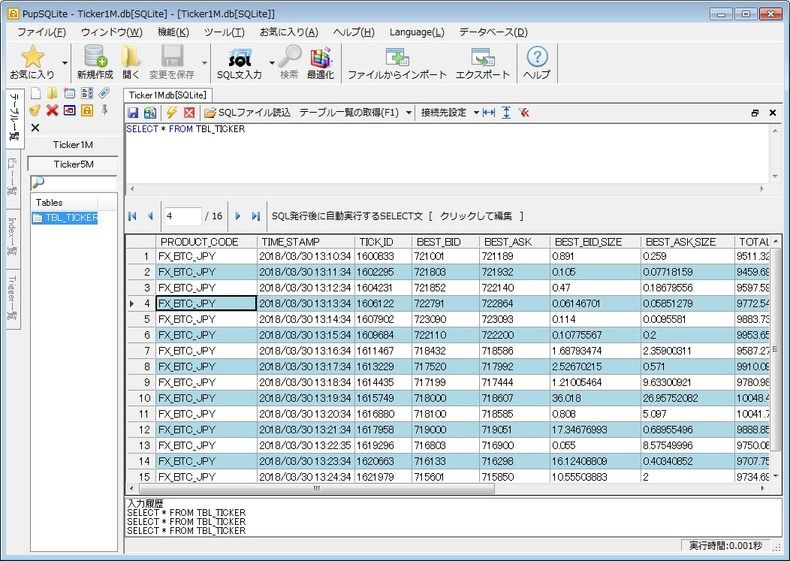
無事に1分毎のデータが取れました。
ただ、これでいいのだろうか。。
まとめ
pubnubによる配信(タイミング)でデータ登録するのではなく、こちらからタイミングを決めてデータを登録する方法でした。
まだちょっと非同期やスレッドの部分であいまいなところがあり躓いてしまったのでそこらへんも勉強していこうと思います。
ではでは。